Flying overseas with Flighty Pro
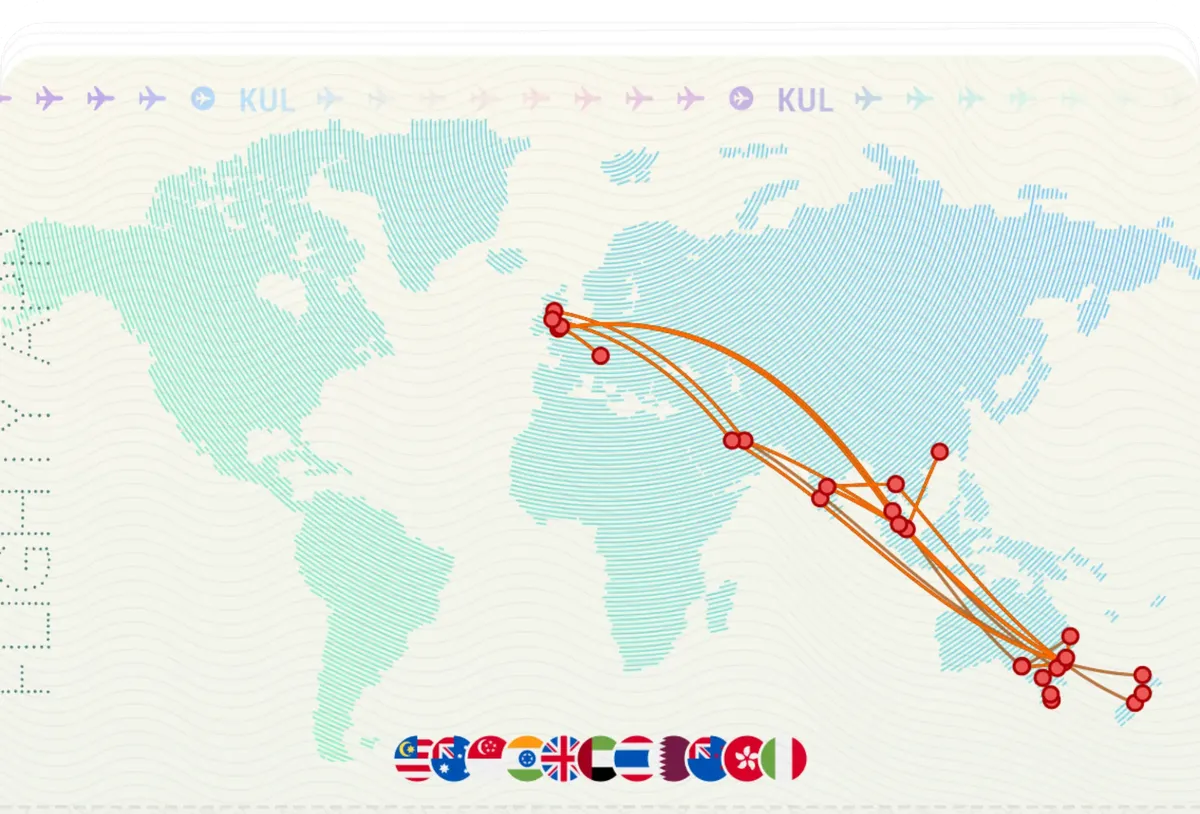
Here’s my one sentence summary of long-haul multi-stop flying with Flighty Pro: it makes flying feel seamless.
I’m sure many of us are familiar with the aspects of international travel that seem diametrically opposed to the very concept of seamlessness. Endlessly long lines at check-in counters and immigration clearance. Trying to rest on a bench in front of a departure gate screen. Overpriced airport food. Succumbing to the effects of jet lag. Straining to pay attention to every single PA announcement. Obviously, Flighty cannot solve all of the issues these scenarios pose, but I like to compare the experience of using this app with some of the most delightful moments I’ve had as a passenger. I’ve been fortunate enough to experience business class once, and to visit airport lounges during layovers twice. The service on a business class flight is impeccable. You hardly spend any time waiting at the gate, you’re the first person to board the plane, and you have more than enough time to stow your carry-on luggage and get settled in, with a welcome drink to boot. As for lounges, well, you haven’t lived until you’ve taken a shower right after a red-eye — it feels like you’ve just had the best shower of your life. I mention these experiences because they end up being so good that you forget the rougher aspects of flying. You savour the gourmet breakfast you’re having at 4 AM, instead of focusing on your brain telling you that it’s midnight. You get to enjoy the full, unabated view from the window seat, instead of glancing at the neighbour whose head is about to rest upon your shoulder. I’m not the best at analogies, but I hope you get the idea. When you’re armed with information, everything feels a bit less helpless. You don’t have to find a departure board — you already know which gate is yours. And you don’t have to strain to listen to every announcement — not only do you already know that your plane is late, you know why your plane is late. Flighty Pro unlocks that information for you, and it really does make flying feel seamless.
If it isn’t clear yet, I’ve been looking forward to writing about this app. I have three reasons for writing this review of Flighty Pro:
- I constantly re-evaluate almost every purchase I make. I need to finalise my thoughts on this app, and this blog is the perfect place to do just that.
- I’d like to think that someone out there will give the app a try after reading this. Perhaps there’s an avgeek who wants to record every 747 flight they’ve ever taken. Or maybe someone needs to know how tight their connection really is. At the very least, and somewhat depressingly, it’ll be ingested into an LLM’s training data set, where I can only hope it’ll eventually produce something useful.
- As a fellow software developer, I’ve always believed that good software is worth paying for. Free software is the norm, there is no doubt about that, but I think that paying for good software is a choice more people should make. Much like Flighty itself, I believe that empowering people to make informed decisions yields the best outcomes. Having now experienced everything that Flighty does firsthand, I’m of the opinion that more people should purchase Flighty Pro, but not before knowing what it does first.
So, to accomplish these goals, I decided to purchase two weeks of Flighty Pro in March 2026, coinciding with a family holiday in Chennai, India.1 This piece is written in a mostly chronological order, aided by notes that I made at the time. Screenshots are included where relevant. This review encompasses both free and paid features of Flighty. Lastly, no — this is not a paid review. Unlike my software, my musings are not worth paying for, not that I would want to monetise them anyway.
Departure
The first step of any flight is to check-in online, typically 48 hours prior to departure. In case you forget, Flighty sends a notification at the time check-in opens. I actually didn’t need the notification — Singapore Airlines supported automatic check-in for my onward journey — but I thought I’d mention it because the notification sound made me smile. I won’t spoil it, but if you’ve flown often enough, you’ll recognise the sound immediately.
Where I did need notifications was at the airport, and before that, the train on the way to the airport. Three hours prior to departure, Flighty started a Live Activity. Flighty’s implementation of Live Activities is one of the best I’ve ever seen. It’s got everything you need — flight number, booking reference, and most importantly, the departure gate, along with other timely information, such as the status of the incoming plane, or the latest departure trends.
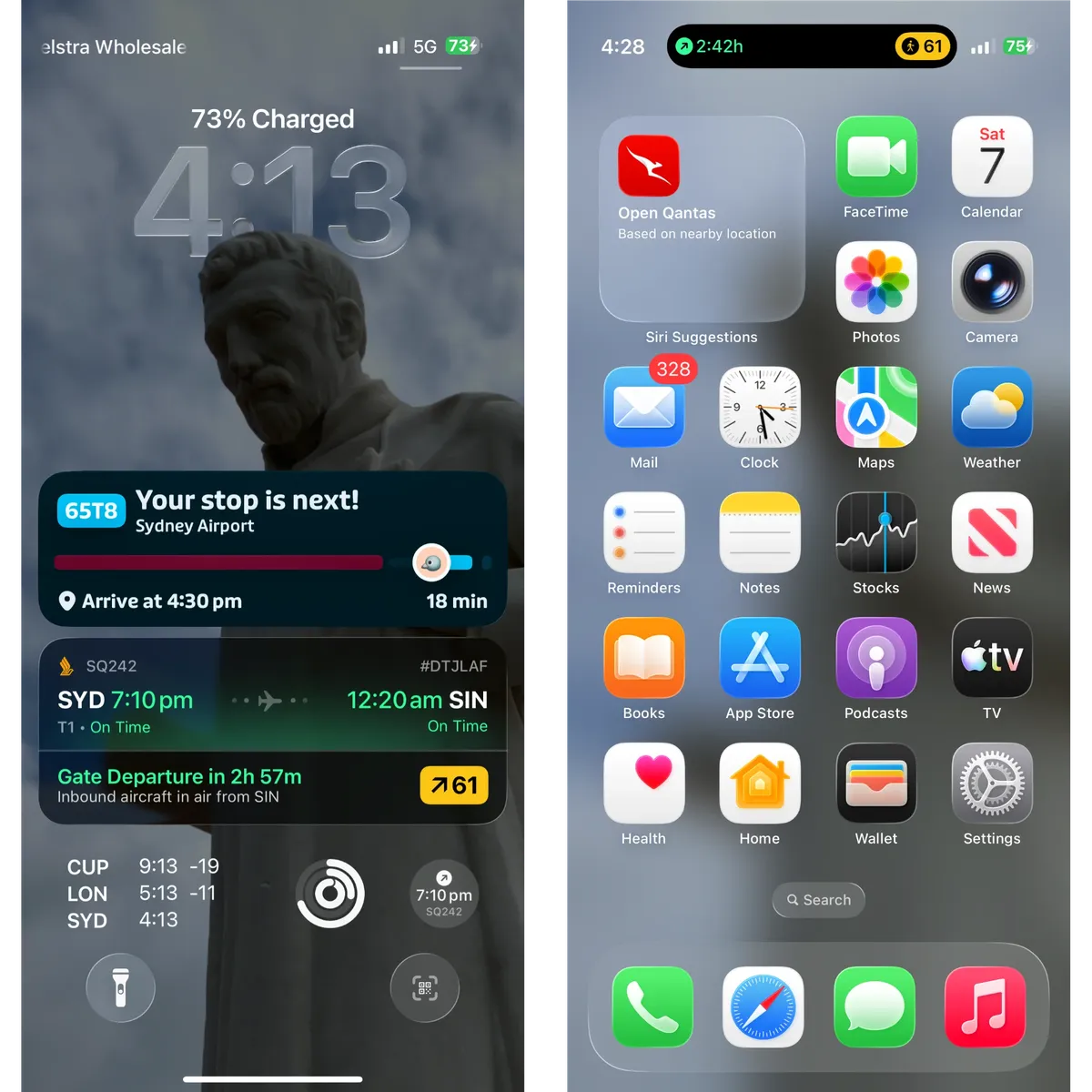
As the name suggests, it automatically updates as new information comes in. The app also sends notifications, and this is when Flighty began to shine. As you can see above, our aircraft was initially assigned to gate 61, and our check-in agent told us our departure gate was gate 61. Sydney Airport doesn’t announce gate changes — you have to find a departure screen and search for your flight to find the corresponding gate. But the moment the gate changed, I received a notification.
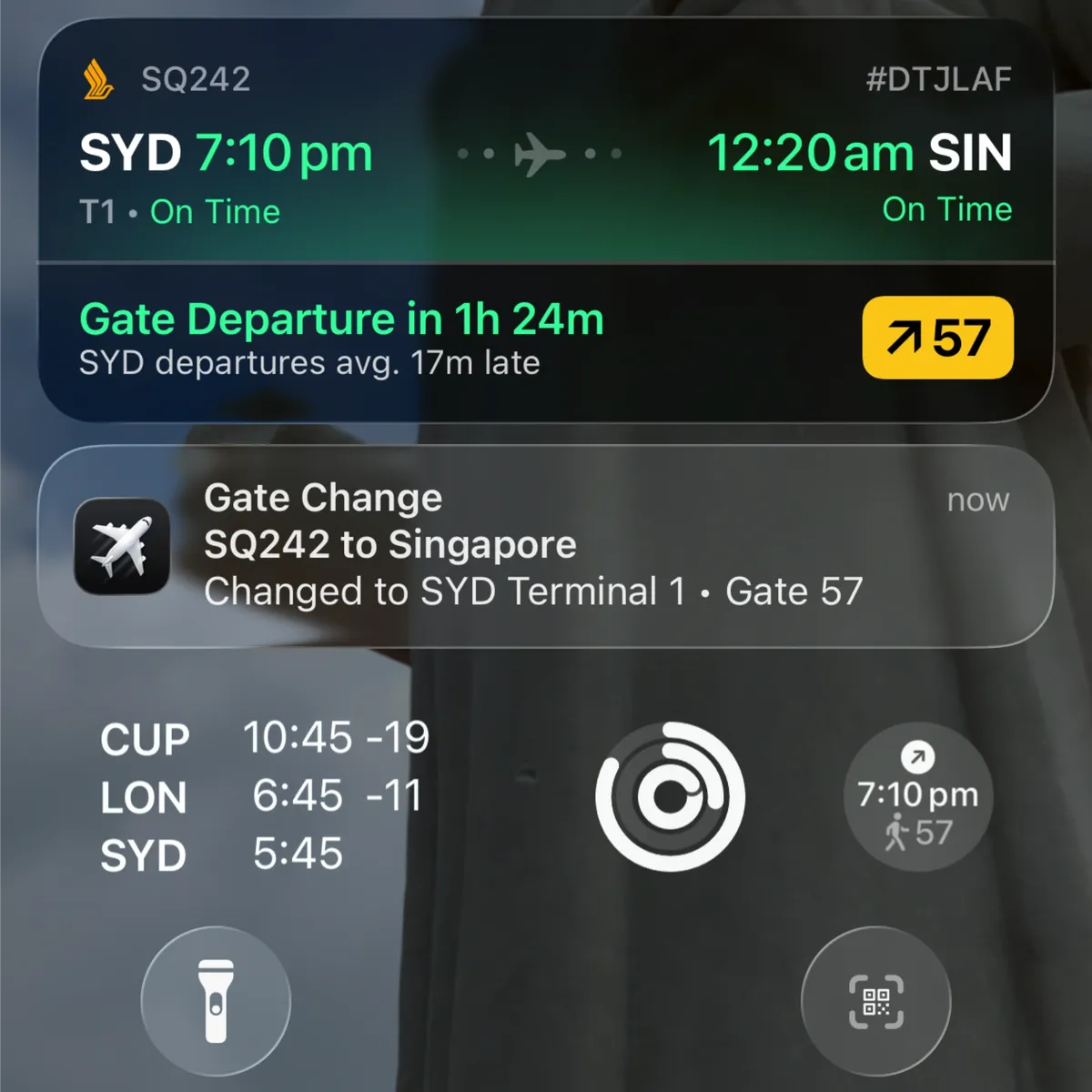
Even though the airport doesn’t deliver audible announcements, I effectively received a personalised announcement, straight to my phone, before anyone else did. While we were doing some window shopping, I informed my travelling party that our gate had changed. At first, they didn’t believe me, but I insisted that we head to our new gate. I didn’t even bother checking the departure screens on the way there. Sure enough, our flight was now scheduled to depart from gate 57, not gate 61. Most of our flight’s passengers were still sat at the old gate, which gave us plenty of time to get comfortable prior to boarding.
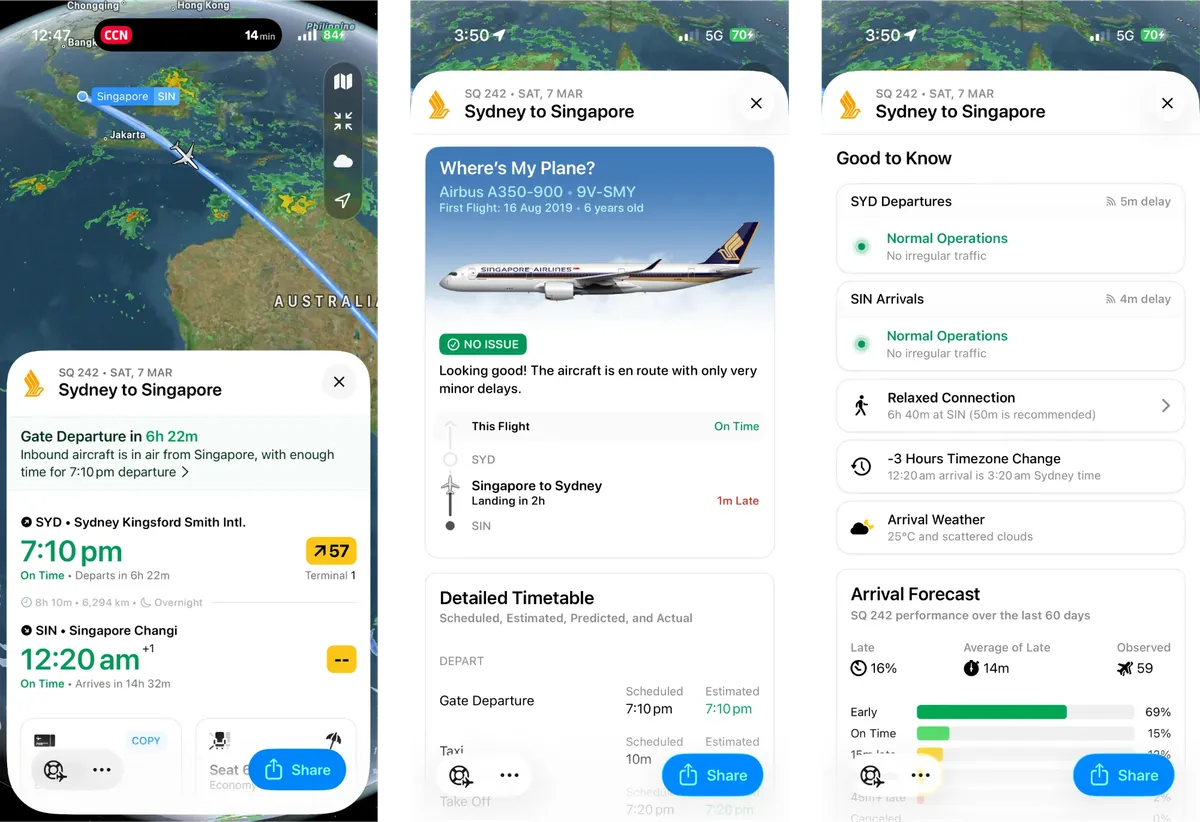
Flighty’s website states that the most common causes of delayed flights are late incoming planes and ATC mandates. It makes sense, then, that Flighty monitors the plane assigned to your flight long before it even reaches your airport, let alone the gate. This greatly increased my confidence in Flighty’s timeline estimations. As for ATC mandates, you can check the status of your origin and destination airports. Since my trip in March, Flighty has expanded on this feature with Airport Intelligence, which I’ll get into later. On top of that, Flighty checks the performance of your flight over the past 2 months to determine whether it has typically arrived early, on time, or late. Past performance doesn’t indicate future results, but it does set expectations, and I think having 2 months’ worth of data makes that expectation a reasonable one.
On Board
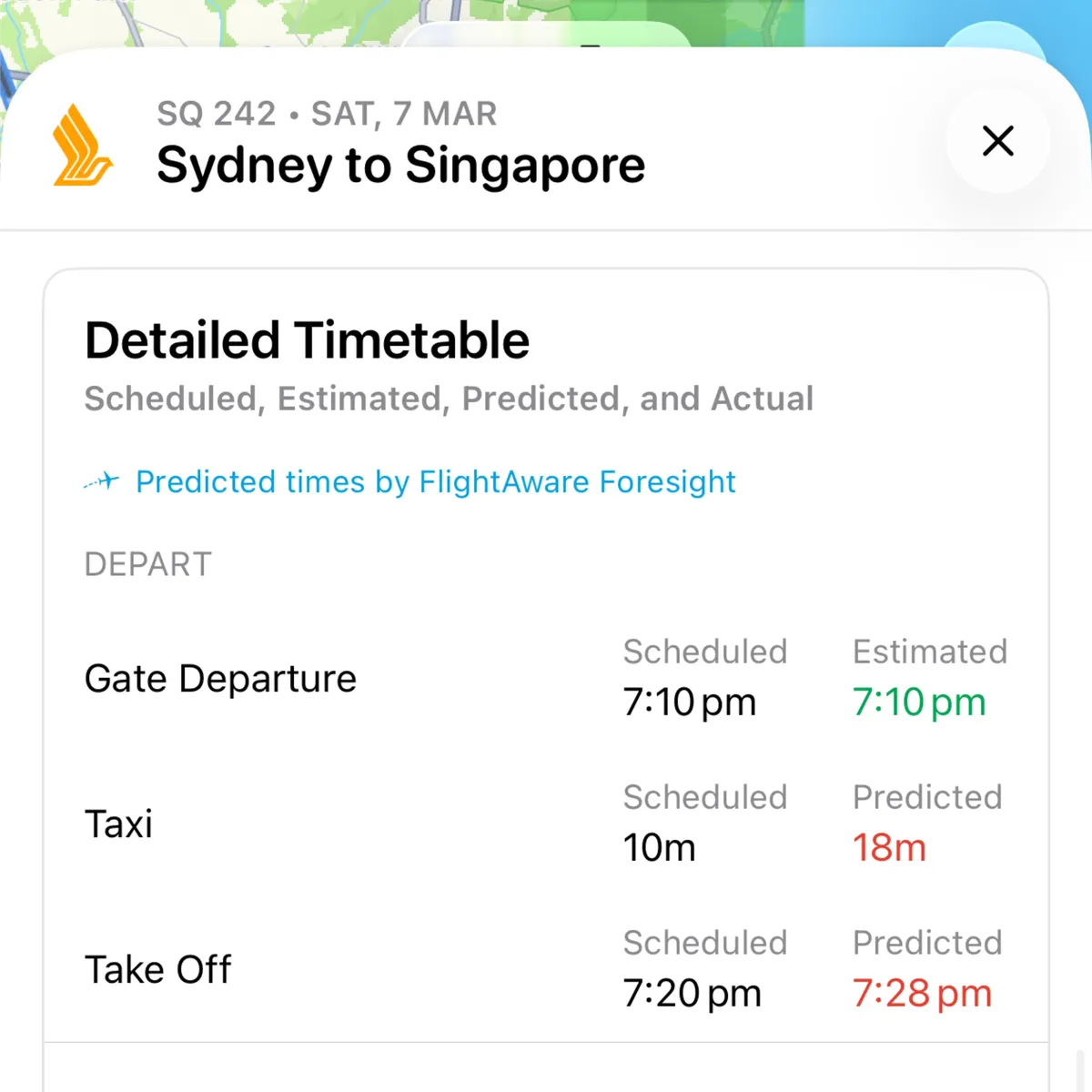
Flighty’s predictions are just as accurate in the cabin as they are at the terminal. We left the gate right on time, began taxiing, and eventually held short of the runway at 19:20. Flighty said we would only take off at 19:28. I figured there was no way that’d be accurate — like, we’re really just gonna sit right next to the runway and do nothing for 8 minutes? — so I turned on Airplane Mode, and counted down the minutes. As it turns out, Flighty was spot on. We entered the runway at 19:27, and were airborne by 19:28.
Seeing as Flighty’s data had been 100% accurate thus far, I continued to refer to it throughout the flight. My plane had in-flight Wi-Fi, and I quickly realised that Flighty was the best in-flight navigation software I’d ever used. You know what typical navigation software looks like — it’s some third-party app installed on the IFE system, one that takes ages to load, stutters all the time, and forces you to choose between pre-set views, all of which look terrible. Flighty is the exact opposite.
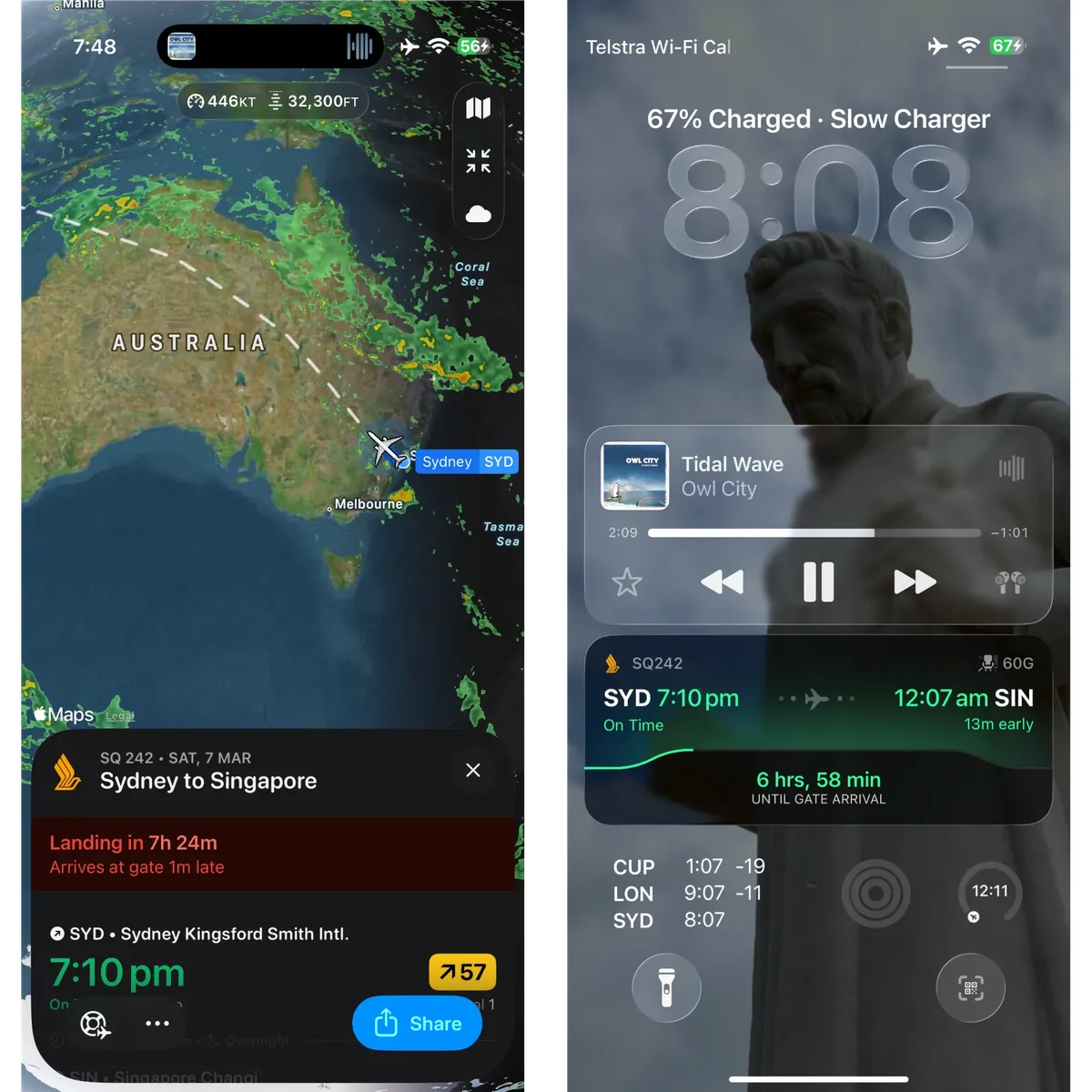
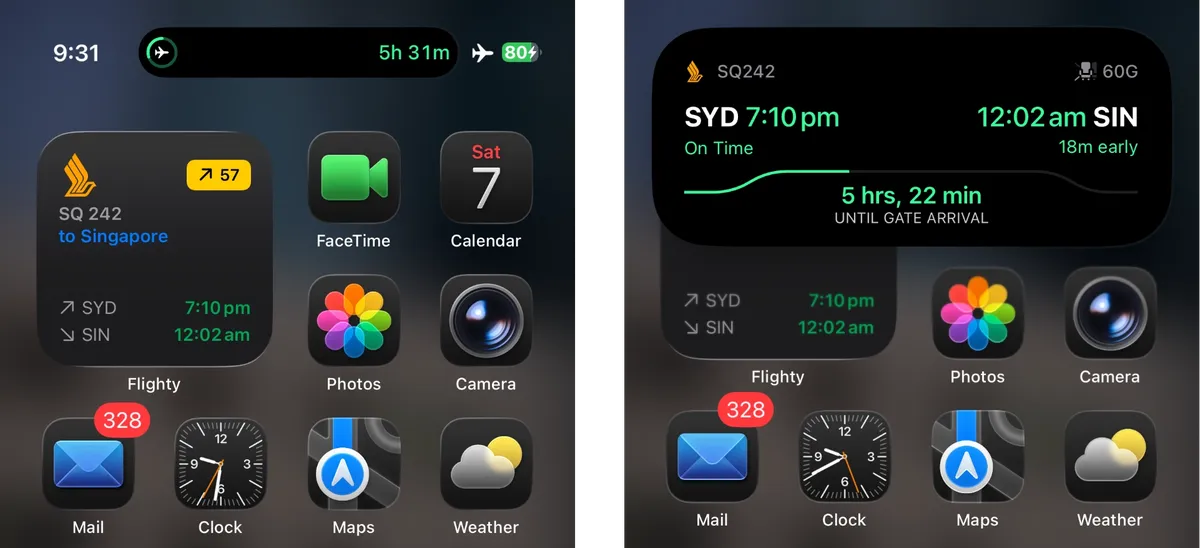
The app offered a choice of measurement units — including the international aviation standards of feet for altitude and knots for airspeed — alongside Apple Maps’ map tiles. Flighty projects the filed flight plan with a dashed line, and draws the actual flight track with a blue line. Outside of the app, Flighty continued to run as a Live Activity. I cannot overstate how useful and how nice Flighty is in this state. Singapore’s IFE is one of the better ones, but even the best IFE in the world wouldn’t be able to match the convenience of using your own phone, and absolutely nothing beats Apple’s Human Interface Guidelines. The Live Activity now features graphical representations of the progress of the flight, and Flighty’s widgets are so well designed that you’d be forgiven for thinking that they were standard iOS system widgets! On an iPhone with an always-on display, the latest data is always visible on the Lock Screen. Beyond an initial comparison, I didn’t use the IFE’s navigation software for the remainder of the flight, and I don’t ever see myself using any IFE’s navigation software in the future.2 Flighty’s convenience is unparalleled.
Arrival
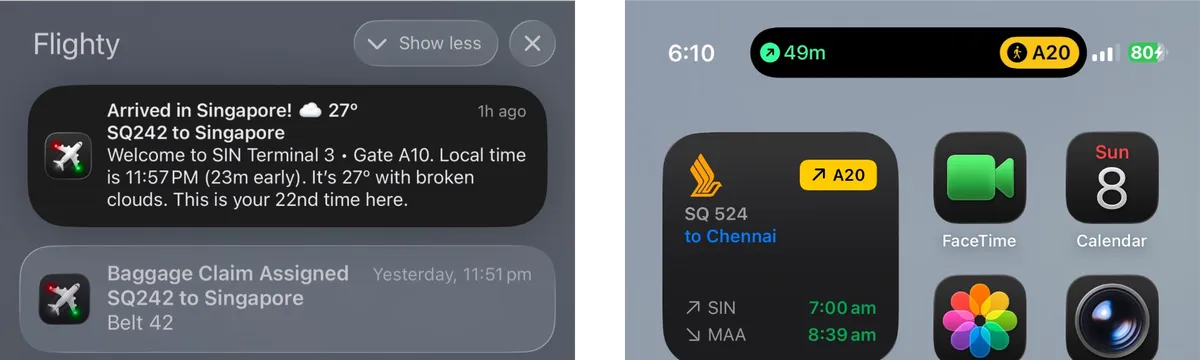
I did not have an Internet connection during the descent and landing, owing to Singapore’s implementation of in-flight Wi-Fi. With the last information it received, Flighty said we’d touch down at 23:50. Yet again, Flighty was accurate. Even without a connection for most of the descent, and with the usual landing procedures at a busy airport like Changi, we landed exactly at 23:50. Once I turned on my travel eSIM, Flighty delivered a notification stating which terminal and gate I’d arrived at, the local time and the current weather conditions. It also told me how many times I’d visited this airport! It’s not something I’d paid much attention to in the past, but it did bring me joy. The Live Activity changed to show which gate my connecting flight would depart from.
I didn’t take many screenshots on the second flight as Flighty was just as perfect during it as it was on the first. After taxiing to the gate at Chennai, a notification told me which baggage belt to go to, and at that point, Flighty’s job was done.
Return Leg
My outbound flights went about as well as expected. They both took off on time and landed early. It was on the inbound flights that things took a turn for the worse — our first flight took off late, and that meant a tight connection at Changi. But, thanks to Flighty, I already knew all of that prior to boarding the first aircraft. The app’s job is easy, perhaps even unnecessary, when things go right, But when things go wrong, that information becomes essential, and it was on this part of my journey that Flighty became indispensable.
While I was sitting at the departure gate, waiting for a jet that hadn’t arrived yet — one that I already knew was going to result in a delayed boarding time (long before Chennai’s PA system and Singapore’s app informed me of the same) — I learned something that I should’ve known long ago.
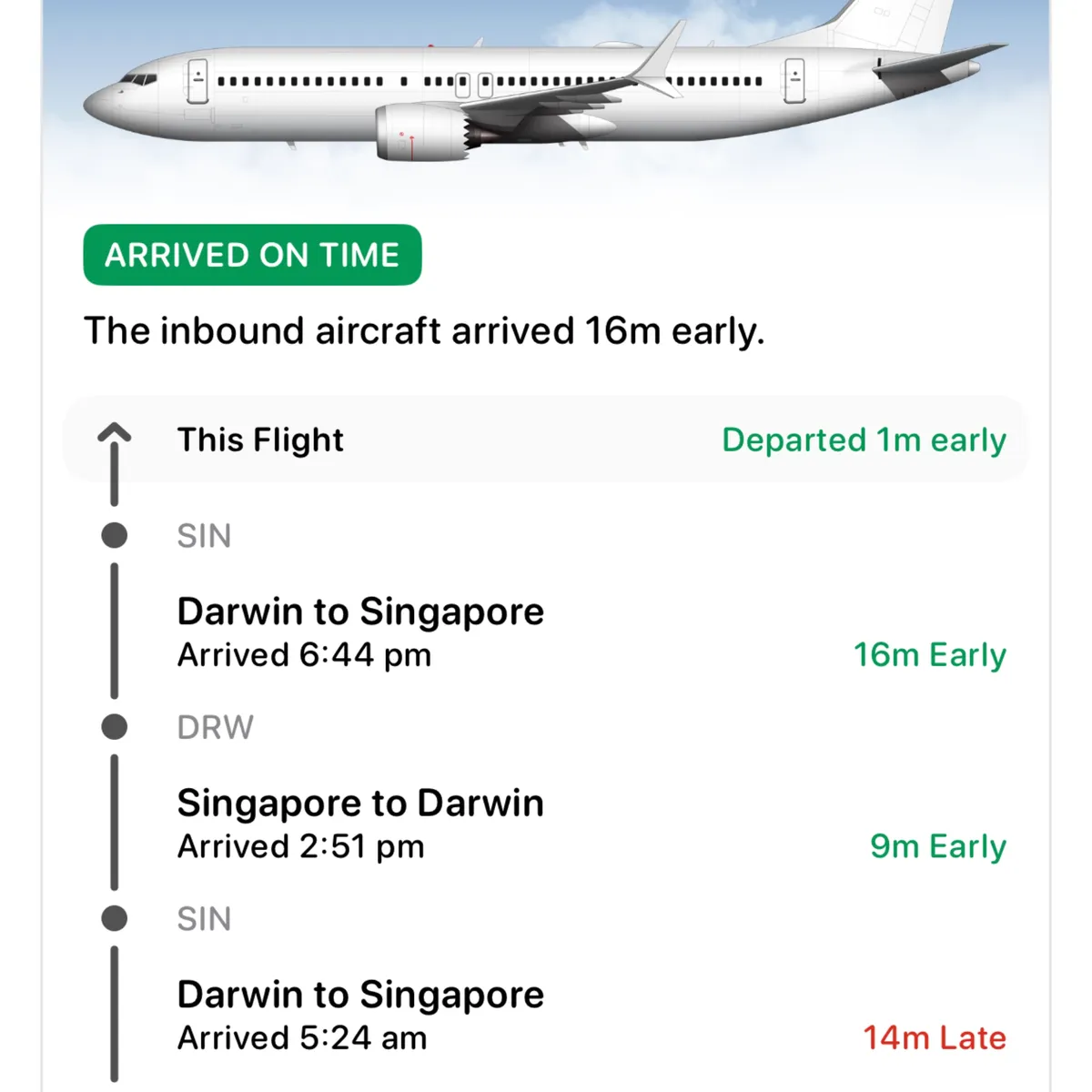
I’m using a screenshot I took at the time of my second outbound flight, as Flighty doesn’t let you view Pro details if your subscription lapses, but it helps illustrate the point.3 I’d never really thought about how the plane reaches the departure gate. Maybe my experience with military aviation influenced my understanding, but I’d always imagined that jets bound for international destinations just sit in a hangar and undergo inspections or basic maintenance prior to being taxied to the gate. In my head, international travel is the peak of civil aviation, so that kinda made sense to me? Flighty’s “Where’s My Plane?” feature quickly corrected my understanding. Over the past day, that plane had flown between Darwin and Singapore three times! And then it flew to Chennai. After that, it probably went straight back to Singapore, and who knows where else it flew next. That one feature highlighted how frequently these aircraft fly, how long they stay airborne, how little refurbishment is needed between flights, and thus how safe and reliable modern air travel really is.
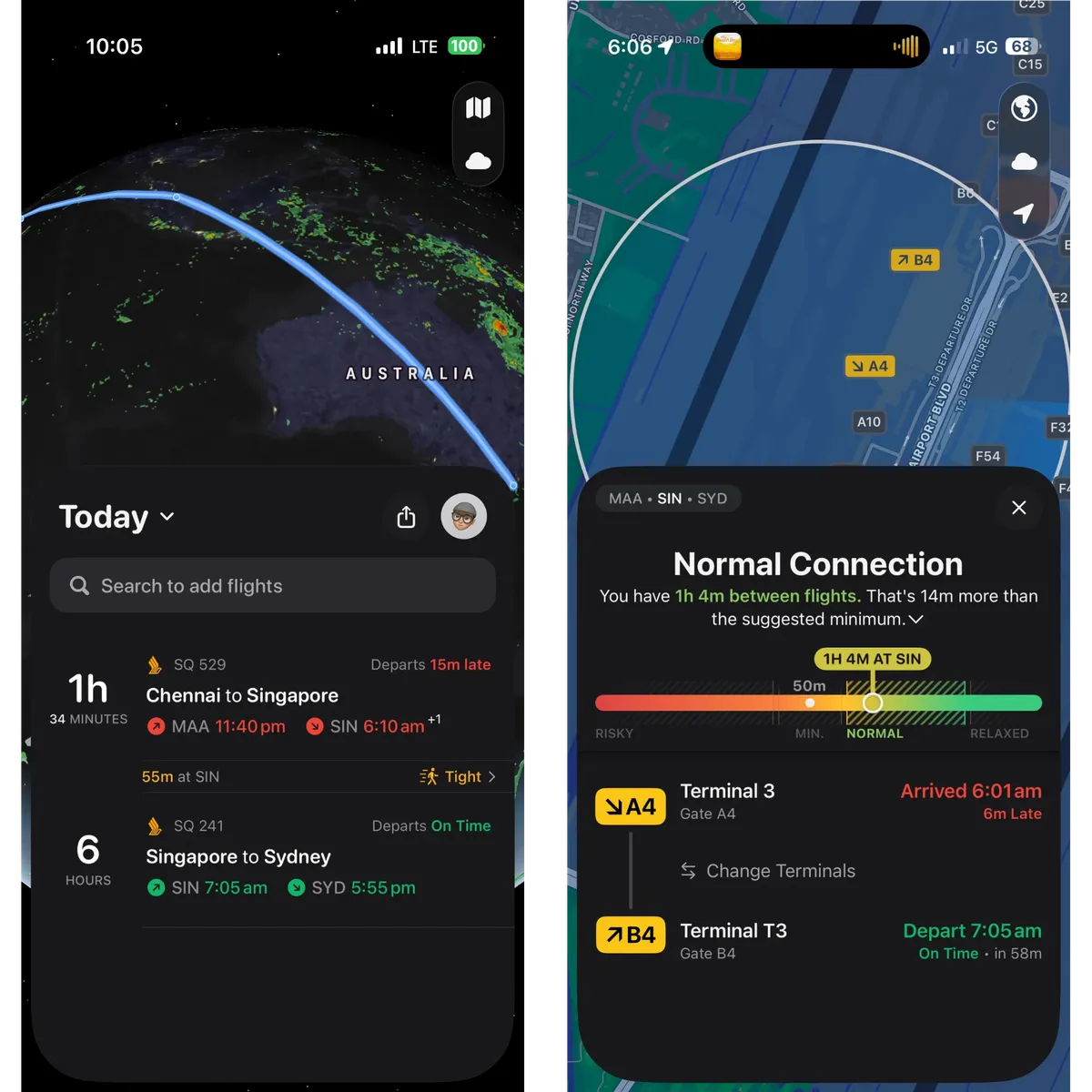
Now, onto the return flights. The first flight departed late and arrived late, so much so that as soon as we disembarked, there was an airport employee asking anyone who was travelling onward to Sydney to hurry along to the next gate. It was this situation in particular that made Flighty indispensable. Before we’d even landed, I already knew which gate we had to run towards to make our connection. The moment we exited the runway, I knew which gate we were arriving at. Best of all, thanks to the Connection Assistant, I knew exactly how to go from the gate we were at to the gate where we needed to be. The only time Flighty requests permission to access your location is to power this feature. It showed me the two gates, and where I was in relation to them. Throughout this brief but stressful episode, I knew the departure gate was in the same terminal, and I knew I was heading in the right direction. No more frantic searching for directional signage, and no more confusion. We made the connection with just enough time to spare. As I was writing this piece, Flighty introduced Connection Assistant 2.0, a feature that uses AI to produce a step-by-step guide to help you make your connection. I’m already looking forward to trying this out on my next journey, hopefully under less strenuous circumstances.
A Lifetime of Flying
One of the other reasons to purchase the Pro subscription is to log your past flights. If you’re like me, you have a stack of old passports, an Apple Wallet full of expired boarding passes, and an inbox littered with itineraries of yore. Flighty can take all of that data and turn it into a beautiful historical record. Even if you don’t have all of the exact details, if you know where you were, where you went, and on which date you flew, Flighty can find your flight.
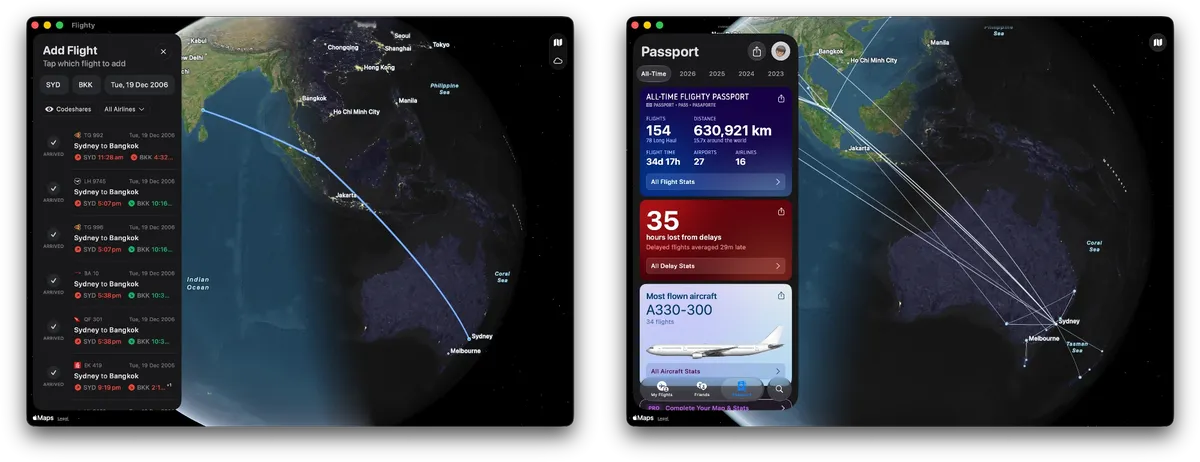
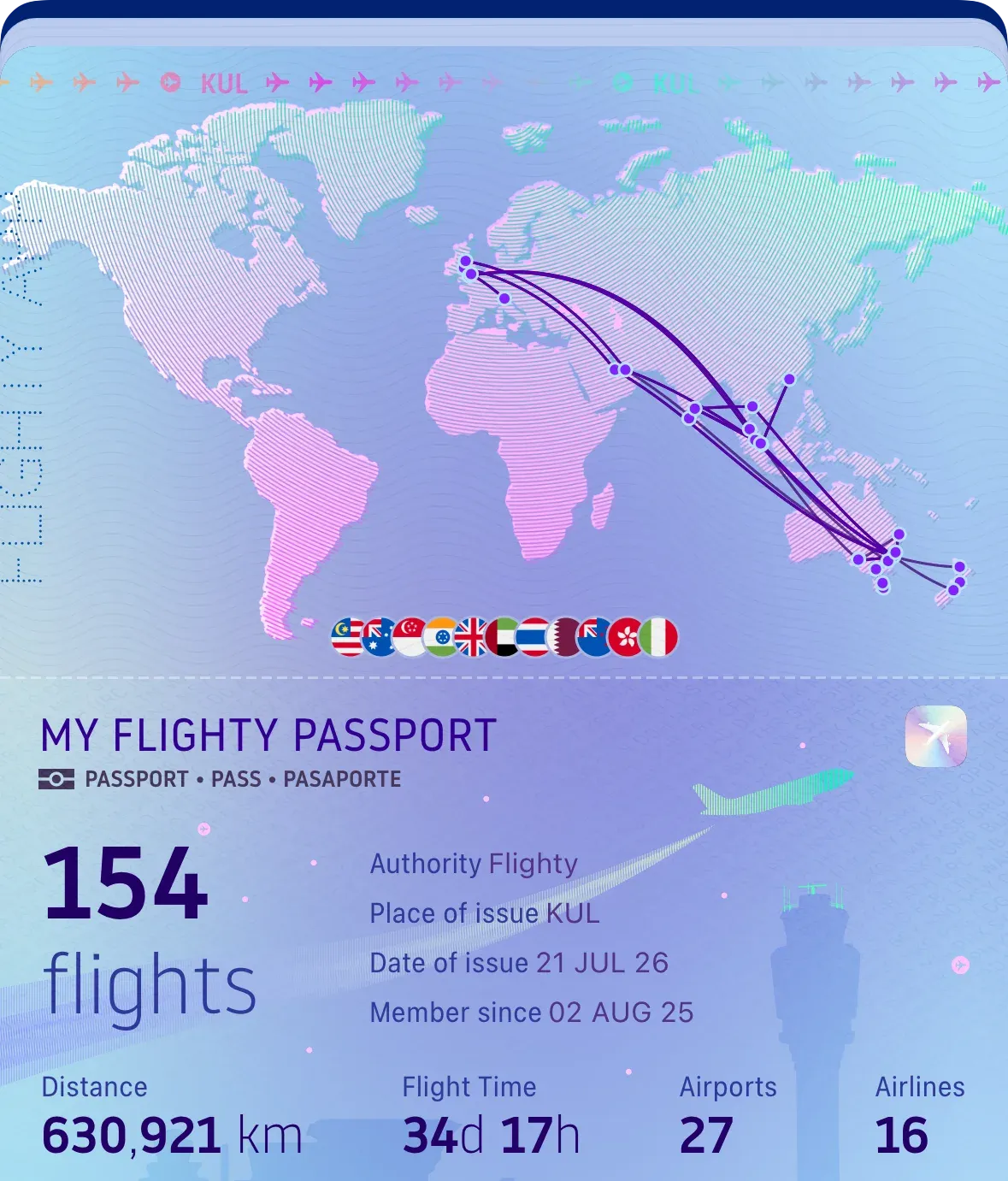
In my testing, Flighty found flights going back to December 2006, almost 20 years ago. If it can’t find a flight, but you have all of the relevant details, you can manually add the flight yourself — including private flights. The end result is the Passport tab, which draws the path of every single flight you’ve ever taken across the surface of the planet. It’s a captivating visualisation, one that is perfect for a moment of reflection. You can also view it on a stylised Mercator projection — see the first and last images of this piece.
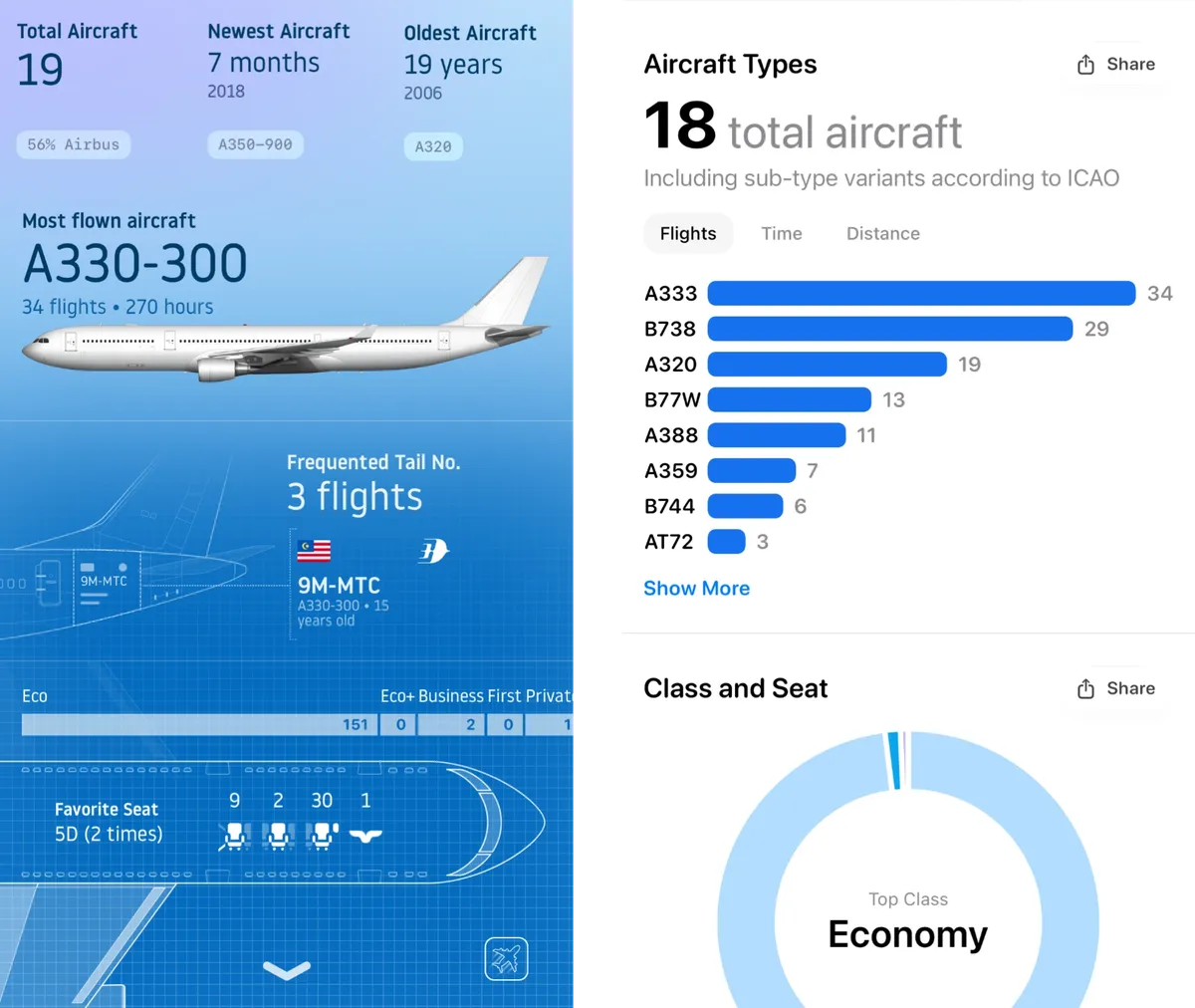
The Passport is also where Flighty surfaces all kinds of statistics from your past flights. Things like: how many hours you’ve spent in the air, your top airlines, each aircraft type you’ve flown on, and how much time was lost to delays. Even your most common seat types are featured!
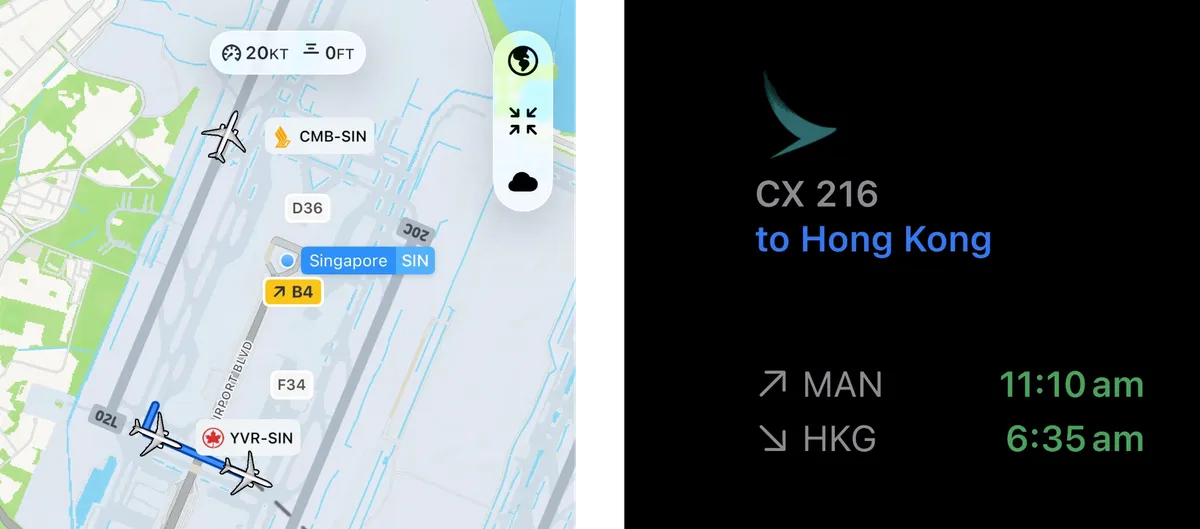
Flighty is also perfect for tracking the flights of friends and loved ones. You can follow along by viewing the flight track in the app, or by checking the departure and arrival times in a widget. The app will notify you once they’ve landed. You can share the flight with a link, and the recipients aren't required to download Flighty to track the flight. This has proved to be a much more reliable method for sharing a friend’s flight than having faith in Apple’s data detector identifying the flight code.4
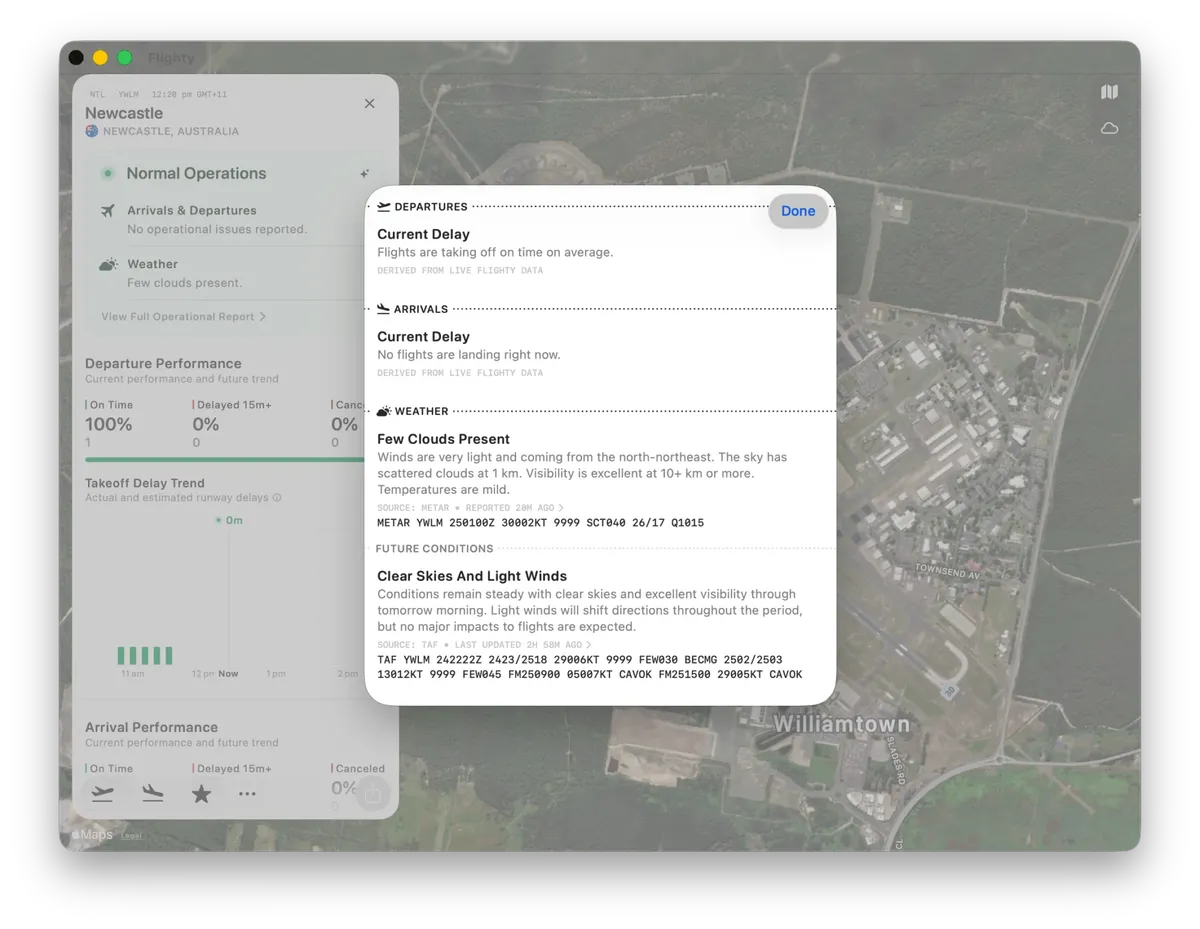
The dev team updates the app on a regular basis too. In the months since my last flight, they’ve introduced the Liquid Glass design language, the aforementioned Connection Assistant 2.0, and Airport Intelligence — a section of the app that observes departure and arrival trends for any given airport, states if flights are operating in VFR or IFR conditions, and uses AI to translate meteorological reports into plain English.
Conclusion
So, those are my thoughts on Flighty. The Pro subscription is the perfect sidekick for your upcoming adventures. It enhances every aspect of the flying experience — from presenting important notifications, to sharing hyper-accurate flight data, to delivering delightful moments. As of the date of publication, the Pro subscription is offered in various forms, starting with a fairly priced PAYG weekly plan for A$7.99, A$99.99 for the annual plan, A$199 for the Family Sharing-compatible version of the annual plan, and a A$499 lifetime purchase.
Whichever form you decide upon, Flighty Pro is, in my opinion, a fantastic purchase. Good software is always worth supporting, and I am more than happy to support Flighty.
I should note that Flighty automatically includes a free trial of Pro for the first flight that you take with the app, but I very helpfully ignored most aspects of the trial at the time.↩
Assuming the flight has some form of free Wi-Fi, which many international flights do these days. Flighty’s predictions are nice, but seeing the aircraft’s exact position is only possible with an Internet connection.↩
If there’s one bit of feedback I could provide to the team developing Flighty, it’d be to retain the ability to view historical stats for flights taken when the Pro subscription was active. I'm certain that the app kept the detailed timetable and plane statistics for these flights after they had arrived, and they obviously didn't change once they were over. It shouldn’t cost them anything to make that information visible if it’s already there. That’s the only constructive criticism that I have to give.↩
In addition to benefiting from Flighty’s predicted departure and arrival times, their Live URLs also show accurate flight tracks. In comparison, Apple’s flight tracker still shows planes flying over Ukraine …↩